Introduction: What Is Programmatic Advertising?
Programmatic advertising is automatic buying and showing of ads using software. Instead of manually contacting websites or agencies, you simply decide:
- Who should see your ad
- Where it should appear
- How much you want to spend
The system does the rest, showing your ad to the right audience at the right time.
Think of it as smart, automated advertising that works 24/7.
For a detailed understanding of Programmatic Advertising, read our previous blog to explore key concepts and practical insights. Click here to learn more👉 Programmatic Advertising for Beginners
Why Beginners Should Use Programmatic Ad
Programmatic ads are ideal for beginners because they:
✅ Target the right audience without guesswork
✅ Save time and effort
✅ Provide real-time results
✅ Are cost-efficient
Even small businesses can get results quickly when set up properly.
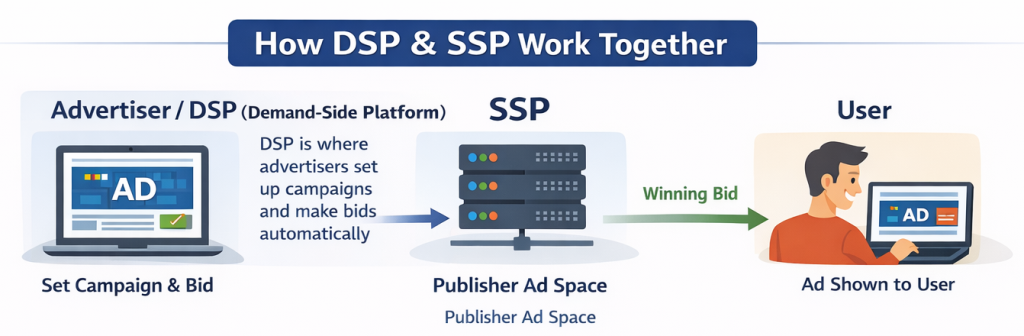
Key Players: DSP & SSP
Understanding how programmatic ads are delivered is simple when you know the main platforms:
1. DSP (Demand-Side Platform)
- Where advertisers set up campaigns and bids automatically
- Examples: Google Display Network, The Trade Desk
- Controls who sees your ads and how much you bid
2. SSP (Supply-Side Platform)
- Where publishers (websites/apps) sell their ad space automatically
- Examples: Magnite, PubMatic
Connection: DSP ↔ SSP → Ads shown to user.
It works like a real-time online auction happening in milliseconds.
Step-by-Step Beginner Workflow for Programmatic Ads
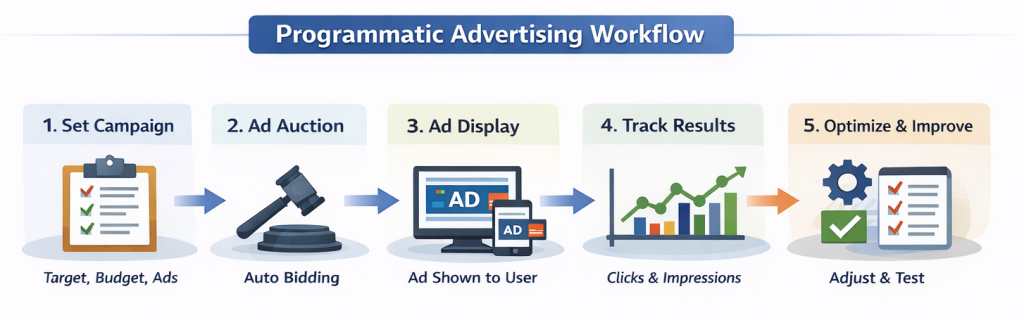
Step 1: Set Up Your Campaign in a DSP
- Decide your budget, audience, and ad creatives
- Example: “Get 500 website visitors in 30 days”
Step 2: DSP Bids for Ad Space
- Automatically competes for relevant ad spaces on SSPs
Step 3: Ad Auction Happens
- Highest bid is selected in real-time
Step 4: Ad Display
- User sees your ad instantly
Step 5: Track Results
- Monitor clicks, impressions, and conversions
- Identify which ads and websites are performing best
Step 6: Optimize
- Adjust targeting, budget, or ad creative
- Test one change at a time for better results
Tips for Beginners to Run Programmatic Ads Successfully
- Know Your Audience: Age, location, interests, online behavior
- Keep Ad Creatives Simple: Clear headline, short images or videos, strong CTA
- Start Small: Daily budget ₹500–₹1,000, campaign 7–14 days
- Target Smartly: Use interest targeting, contextual targeting, or remarketing
- Monitor & Optimize Daily: Pause poor-performing ads, improve landing page
Common Beginner Mistakes
❌ Targeting everyone
❌ Spending full budget at once
❌ Confusing ad text or visuals
❌ Ignoring landing page optimization
❌ Not checking results daily
Example Beginner Campaign
Business: Online marketing course
Budget: ₹1,000/day
Audience: Age 22–40, interested in digital marketing
Platform: Google Display Network
Results after 10 days:
- 5,000 impressions
- 400 clicks
- CPC: ₹25
- 30 leads
Shows that small, optimized campaigns can deliver results quickly.
Final Thoughts
Programmatic advertising is fast, automated, and effective.
For beginners:
- Start small
- Track results daily
- Optimize regularly
- Scale gradually
With patience and testing, you can reach the right audience and grow your business efficiently.
Looking to grow your business online and reach more potential customers? At Biovus Blockchain Technologies, a leading digital marketing agency in Tamil Nadu, we help businesses enhance their online presence and generate organic leads effectively. Our expert team uses proven strategies, targeted advertising, and tailored campaigns to boost your visibility and grow your business in a short time.
Reach out to us today and take your business to the next level! Visit: www.biovustechnologies.com
FAQs
1. What is programmatic advertising?
It is automatic buying and showing of ads online to the right audience.
2. How does it work?
Ads are bought using software, and shown to users based on data in real time.
3. How is it different from Google or Facebook Ads?
Programmatic works across many websites and apps, not just one platform.
4. What are the benefits?
You reach the right people, save money, and track results easily.
5. How much does it cost?
Cost depends on audience, ad type, and bidding method. You can start small.
6. What is a DSP (Demand-Side Platform)?
A tool advertisers use to buy ad space automatically.
7. What is an SSP (Supply-Side Platform)?
A tool publishers use to sell their ad space to advertisers.
8. What is real-time bidding (RTB)?
Ads are sold in milliseconds through auctions to reach the right audience.
9. What ad formats are available?
Display banners, video, native ads, mobile ads, and audio ads.
10. How can I target my audience?
You can target by location, interests, behavior, age, and device type.
11. Can small businesses use it?
Yes! Small businesses can run targeted campaigns on a budget.
12. What mistakes should I avoid?
Avoid broad targeting, ignoring results, and relying only on automation.
13. How do I measure success?
Track clicks, impressions, conversions, and ROI.
14. What is a private marketplace (PMP)?
A special auction for premium ad space, only for select advertisers.
15. How do I get started?
Choose a DSP, set audience and budget, run your first campaign, and monitor results.
16. What tools do I need?
DSP, analytics tools, and optionally a data management platform (DMP).
17. Does it improve ROI?
Yes, by showing ads to the right people at the right time.
18. Is it good for local businesses?
Yes, you can target people in specific locations easily.
19. Can I run video ads?
Yes, you can run video ads online and on apps.
20. How can I improve performance?
Check results regularly, update ads, and adjust targeting.